Element Mode
Element Mode is used to move between clickable elements such as links, buttons, and text fields. What happens after selecting an element depends on the command you used in Command Mode or from a shortcut.
For example, if you enter Element Mode through command.moveCursorToElementAndLeftClick, selecting an element will move the cursor to that element and perform a left click.
Selecting Elements
Section titled “Selecting Elements”When Element Mode is active, clickable elements in the active window are highlighted and assigned letter hints. Type the hint to jump the cursor to the target element.
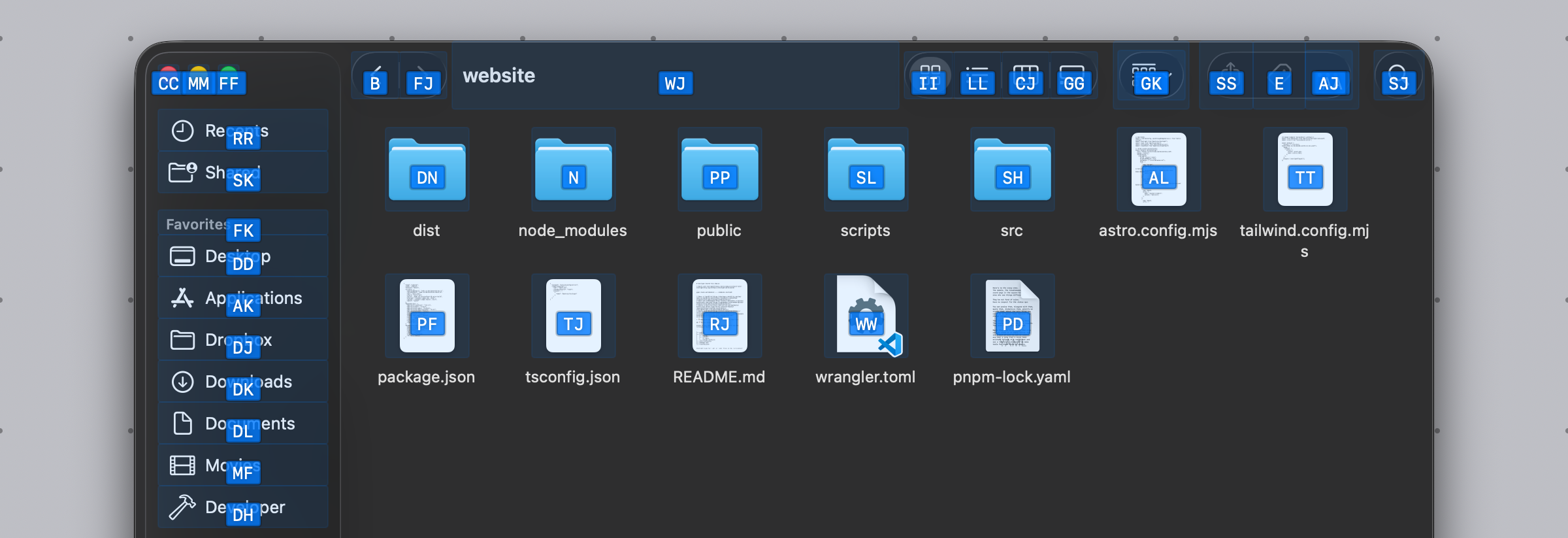
You can also press Enter to trigger the post-action right below the current mouse position.
Element Mode can also search beyond the frontmost window in some cases:
- It can include clickable elements from the previous window in the current Space.
- It can include Finder desktop items.
- It can include Dock items, and still provide a target when the Dock is auto-hidden.
This makes it easier to keep using the keyboard when the target is not inside the current focused window.
Related Commands
Section titled “Related Commands”| CommandIdentifier | Action |
|---|---|
command.moveCursorToElement | Move cursor to element |
command.moveCursorToElementAndLeftClick | Move cursor to element and left click |
command.moveCursorToElementAndDoubleLeftClick | Move cursor to element and double left click |
command.moveCursorToElementAndMiddleClick | Move cursor to element and middle click |
command.moveCursorToElementAndRightClick | Move cursor to element and right click |