Changelog
1.3.5
October 6, 2026
Cursor Crane 1.3.5 adds click count parameters and font choices for hint labels, improves window navigation, and fixes input responsiveness and dragging issues.
New
- Commands that move to and click an element, text, or grid location now accept a numeric parameter to set the click count. For example, if you assign
ftocommand.moveCursorToElementAndLeftClick, type2fand select a target to double-click it, or0fto move the pointer without clicking. - You can now choose System, Atkinson Hyperlegible Mono, or Intel One Mono for hint labels in General settings. Atkinson distinguishes similar characters for low-vision readers; Intel One Mono focuses on legibility and reduced eyestrain for developers.
Improvements
- Favorite window numbers are now restored after restarting Cursor Crane, as long as the windows remain open.
- In Window Mode, you can jump directly to a window in another Space by typing its hint, without first opening the list of windows in other Spaces.
- In Adjust Mode, holding Control while moving a window now allows it to move beyond the screen bounds.
- Improved Action Palette search ranking so frequently used actions appear higher among similarly matching results.
- Repeated arrow-key commands with numeric parameters now run faster and keep subsequent input responsive.
Fixes
- Fixed keyboard input becoming unresponsive while running scripts, workflows, or actions from the Action Palette.
- Fixed window hints being obscured by security dialogs and notification windows, and improved hint visibility for partially visible windows.
- Improved detection of scrollable areas in web content, including nested scroll areas such as those in the latest version of Codex (ChatGPT).
- Improved detection of elements under the pointer, fixing cases where Element Menu Mode could fail to identify targets in apps such as the latest version of Codex (ChatGPT).
- Fixed cancellation and drop timeout issues when grabbing items into the draggable shelf.
- Improved pointer movement and dragging to nearby targets.
1.3.4
September 26, 2026
Fixes
- Attempted to fix OCR getting stuck or returning incorrect positions.
- Fixed an incorrect description in Action Palette settings.
1.3.3
September 24, 2026
Cursor Crane 1.3.3 improves input handling and text search, adds “Expand and Select” to the Element Menu, and improves Element Menu responsiveness.
Improvements
- The Action Palette and Find Mode can switch to your preferred input source when opened, then restore the previous source when closed.
- The Element Menu now offers “Expand and Select” to make selecting elements with tight bounds easier.
- Improved Element Menu responsiveness by avoiding unnecessary window lookups when opening the menu.
- You can exclude Apple menu items from Action Palette menu search.
Fixes
- Fixed Element Menu screenshot actions that could appear unavailable for some elements. Capture failures now show a clear message.
- Fixed text search selection positioning and improved search performance.
1.3.2
September 20, 2026
Cursor Crane 1.3.2 improves window capture and fixes Text Mode in the Mail app on macOS 27.
Improvements
- Window capture now supports offscreen windows.
- Fixed memory leaks affecting OCR, dragging, and window management, improving overall stability.
- Improved window detection for apps that were previously difficult to detect.
- Window hints are now more stable.
Fixes
- Fixed text reading and selection in Text Mode when composing messages in the Mail app on macOS 27.
1.3.1
September 16, 2026
Cursor Crane 1.3.1 improves the Action Palette experience and fixes a crash when working with complex accessibility hierarchies.
We have returned to our regular pricing. If you missed our earlier pricing announcement, you still have one more chance to use the EARLYSUPPOTER code for 35% off through September 21, 2026 at 23:59:59 UTC.
Improvements
- Added input history to Action Palette. Press the Up Arrow key to revisit previous searches that match your current input.
- Action Palette can now be opened without premium access, showing the first matching result and a clear option to unlock the rest.
Fixes
- Fixed a crash that could occur when traversing deeply nested or cyclic accessibility elements in some apps.
1.3.0
September 15, 2026
Cursor Crane 1.3 introduces Action Palette for quickly finding actions across your apps and improves support for macOS 27.
Early supporter pricing ends today, September 15, 2026. Regular pricing begins tomorrow.
New
- Added Action Palette, a foundation for more commands and features in future releases. Open it from Regular Mode (with
/as the default command sequence) to search and run the frontmost app’s menu items, as well as your scripts and workflows. - Added keyboard shortcuts for the first ten visible Action Palette results:
⌘1through⌘0.
Improvements
- Improved support for macOS 27 by updating how Exposé, Mission Control, Stage Manager, and other system surfaces are handled.
1.2.1
September 11, 2026
Cursor Crane 1.2.1 improves pointer stability and the settings experience.
Early supporter pricing ends in mid-September 2026, after which we will move to our regular pricing.
Fixes
- Fixed an issue that could cause the pointer to jump back and forth when moving the mouse after Cursor Crane starts.
Improvements
- Improved the visibility of the introduction hint in the settings interface.
1.2.0
September 5, 2026
Cursor Crane 1.2 makes inaccessible on-screen text selectable and gives command sequences more expressive, repeatable actions.
Early supporter pricing will be available through mid-September 2026, after which we will move to our regular pricing.
New
- Added Text Selection Panel. Select one or more elements in Element Menu Mode to work with text that is otherwise difficult to select, including text in canvases, images, and custom interfaces.
- Command sequences now support characters beyond letters, including numbers and symbols.
- Direction commands accept a numeric prefix to repeat an arrow-key action. With the default
trigger.downsequenceJ, entering3Jpresses Down Arrow three times. - Scroll commands accept a numeric prefix for fixed-distance scrolling. With the default
trigger.scrollDownsequencej, entering2jscrolls down by 100 pixels. - Added a configurable Show Menu action to Input Mode for opening the accessibility menu of the focused text area.
Improvements
- Improved Input Mode tracking when the text selection changes, and preserved its source editor while the find panel is focused.
- Improved clickable element discovery in Figma sidebars and text selection tracking in web-based editors.
- Improved synthesized keyboard events used by scripts and workflows, including modifier handling and cleanup of keys left pressed after execution.
- Improved the timing of Element Menu drag selection, making drag-to-select actions more reliable.
Fixes
- Fixed Text Selection Panel and other overlay panels appearing behind the window they belong to.
- Fixed text search in Input Mode for some web-based text areas.
- Fixed some Element Menu actions running after their selection state had already been cleared.
1.1.4
August 29, 2026
Cursor Crane 1.1.4 improves performance when working with large and complex interfaces.
Improvements
- Improved the performance of element overlays in dense interfaces, keeping Element Mode more responsive when many elements are visible.
1.1.3
August 27, 2026
Cursor Crane 1.1.3 improves element targeting, scrolling, and scripting across a wider range of apps.
Improvements
- Improved clickable element retrieval in some apps. Element Mode now provides better support in Linear, Things, App Store Connect, and other apps that use similar UI structures.
- Improved scrollable area retrieval in some Electron apps. Scroll Mode now provides better support in apps such as Codex.
- Scripts and workflows can now be placed in nested directories.
- Scripts can now retrieve cached elements. When retrieving an element, you can get a
cacheIdand use it to retrieve the same element again. - Scripts now support
fetch; thenetworkpermission is required.
1.1.2
August 20, 2026
Cursor Crane 1.1.2 makes drag-and-drop workflows easier to control and improves element targeting, keyboard hints, and script forms.
New
- Added a draggable shelf for holding items while navigating with Cursor Crane, with commands for grabbing, moving, and dropping items. After updating, manually assign commands to Grab Draggable and Drop Draggable in Settings > Commands.
Improvements
- Improved keyboard grid hints and the appearance of the Text Mode find panel.
- Improved script form keyboard interactions and restoration of the previous window after a script form closes.
- Improved Quick Look media control detection.
Fixes
- Fixed accessibility focus traversal continuing indefinitely in some element hierarchies.
1.1.1
August 13, 2026
This update improves configuration diagnostics and UI details while fixing several reliability issues.
New
- Improved script interaction panels with support for operating the panel using hints, copyable label values, and UI refinements.
- Added support for targeting clickable elements in macOS Stage Manager.
- Added warnings for conflicting command sequences, keyboard shortcuts, and invalid command configurations.
Improvements
- Improved the find feature in Input Mode when working with rich text editing areas.
- Refined animated highlight rendering and improved text bounds diagnostics for troubleshooting.
Fixes
- Fixed a crash that could occur when multiple attempts to exit a stage happened concurrently.
- Fixed command and keyboard shortcut preference decoding so omitted entries are not unexpectedly populated from defaults.
1.1.0
August 6, 2026
Cursor Crane 1.1 expands scripting and workflow automation while making it easier to target several elements and interact with complex macOS interfaces.
New
- Added declarative workflows, which can execute a sequence of built-in actions without JavaScript logic, state, or forms.
- Supported actions include keyboard combinations, mouse clicks, mouse-button holds, element selection with root and filter selectors, and menu item triggers using complete menu paths. See the bundled examples in
Settings > Scriptsto get started.
- Supported actions include keyboard combinations, mouse clicks, mouse-button holds, element selection with root and filter selectors, and menu item triggers using complete menu paths. See the bundled examples in
- Added support for selecting multiple elements in Element Menu Mode by holding Shift while typing element hints, with batch actions in Element Burst Mode and multi-element screenshots and text extraction.
- Added QWERTZ keyboard layout support.
Improvements
- Improved element selectors and scripting APIs with element attribute access, more reliable menu traversal, and better support for matching elements across applications.
- Improved focused-window history tracking and targeting of Finder Desktop elements.
1.0.1
August 1, 2026
This update focuses on performance and stability improvements.
Improvements
- Reduced stalls in Element Mode and Element Menu Mode when inspecting interfaces with large numbers of child elements.
- Improved element discovery performance in Element Mode.
Fixes
- Fixed issues in Input Mode where the Find panel could appear in the wrong position, fail to activate, or render incorrectly in Light Mode.
1.0.2
August 1, 2026
This update improves reliability in interfaces with large numbers of elements.
Fixes
- Fixed an issue introduced by the aggressive Element Mode performance optimization in 1.0.1 that could cause some elements to be missed when many elements were present.
1.0.0
July 26, 2026
🎉 Cursor Crane 1.0 is here. This release introduces a Free plan and optional paid features; you can start a 14-day in-app trial to explore the full feature set.
New
- Added JavaScript scripting, including event-triggered scripts and command scripts. Scripts can inspect and control accessible elements, run shell commands, and present custom forms.
- Added the Keyboard Grid to Grid Mode.
- Added app-specific command sequences and keyboard shortcuts.
Improvements
- Refined the keys and presentation of Proportional Grid.
- Added highlighting when finding text in Text Mode.
- Added Copy Selector to Element Menu Mode, so you can obtain an element selector for use in scripts.
- Adjusted shortcuts for several Element Menu Mode actions; copying all text now only requires
CC.
0.9.9
July 21, 2026
This is a small stability update ahead of Cursor Crane 1.0, which will be released this Thursday.
Fixes
- Fixed an issue that prevented commands from being triggered with their keyboard shortcuts.
- Fixed an issue where Element Mode could fail to detect elements in multi-column browser views, such as Finder’s Column View.
0.9.8
July 17, 2026
This release focuses on bug fixes and small interaction refinements.
Improvements
- Element Menu Mode now prioritizes copying screenshots.
Copy ScreenshotandCopy Window Screenshotare shown by default, while holding Option switches to saving screenshots on the Desktop. - Fixed an issue where the service could become unresponsive when inspecting elements with a very large number of child elements.
- Command Mode has a temporary passthrough key for typing short bursts of text or numbers without leaving Command Mode. Hold Insert by default, or customize the key in
Settings > Command. - Added menu controls for starting and stopping the claw machine from the app menu.
- Improved accessibility children prefetching for more reliable element, scroll area, and Element Burst detection.
- Improved Xcode preview element detection and scaling.
- Fixed title extraction when traversing accessibility elements.
- Fixed new window history tracking.
- Fixed window activation for windows that belong to Cursor Crane itself.
0.9.7
July 11, 2026
New
- Element Menu Mode now includes more actions. You can copy content from the selected element, trigger actions, and capture screenshots directly from the menu.
- Element Menu Mode can now capture screenshots of the selected element or its containing window. By default, screenshots are saved to the Desktop. Hold Option to copy the screenshot to the pasteboard instead.
Improvements
- Improved Text Mode activation so the focused editor window is brought forward before text actions run.
- Fixed an issue where Text Mode could scroll to the wrong position when finding and selecting up to target text.
- Refreshed window snapshots more reliably in Find Mode and Adjust Mode, reducing stale target positions after windows move or change.
- Improved window activation logic.
0.9.6
July 5, 2026
This release focuses on stability and interaction polish, addressing several issues that could interrupt ongoing workflows.
Improvements
- Fixed an issue where Cursor Crane could no longer be controlled with the keyboard when a global dialog appeared, such as an auto-update error alert. The service is now temporarily disabled while the dialog is shown to avoid getting stuck behind a blocked main thread.
- Fixed an issue where the target window was not properly activated before clicking elements in auxiliary windows, making those interactions more reliable.
- Improved pointer movement logic for menu items to avoid accidentally activating other submenus while moving across the menu hierarchy.
- Refined mode exit handling to avoid incorrectly shutting down the service when leaving a mode.
- Adjusted the left mouse button release timing in drag-related commands so drop actions are detected more reliably by apps.
0.9.5
June 30, 2026
New
- Added Adjust Mode, making it possible to precisely resize and reposition windows, drag UI splitters, and fine-tune draggable controls.
- Added Element Mode support for Mission Control, allowing you to directly pick windows and controls inside Mission Control.
- Input Mode Find Mode now supports selecting to the target text.
Improvements
- Adjusted Element Burst Mode shortcuts: use Control + Hint to input hints.
- Input Mode Page Up / Page Down now returns to page scrolling. Added Control + Page Up / Control + Page Down for half-page scrolling, and Option + Page Up / Option + Page Down for quickly moving the cursor up and down.
- Improved OCR quality in Find Mode and other areas.
- Fixed an issue where Find Mode could not match non-Latin characters.
- Fixed an issue where prematurely releasing Space in Element Mode could prevent label input.
0.9.4
June 25, 2026
New
- Added Element Burst Mode, making it easier to copy text that is visible but not conveniently editable, while also surfacing useful values and available actions from the selected element.
- Element Menu Mode can now jump into child elements more directly, so you can continue into Element Burst Mode or manage favorite windows from a more precise target.
Improvements
- Improved accessible element fetching so usable targets are easier to detect across more interfaces.
- Improved drag gestures so apps can recognize them more reliably.
- Fixed an issue where releasing Space during Accurate Movement in Mouse Control Mode could interrupt movement.
0.9.3
June 20, 2026
New
- Added configurable commands for dragging from the current cursor position to an element, matching text, or a Grid Mode target.
Improvements
- Improved how Element Mode traverses elements in lists and tables.
- Improved link click positioning to avoid targeting non-clickable areas.
- Fixed an issue where clickable elements in the Dock could not be selected when they overlapped the current window.
0.9.2
June 15, 2026
New
- In Input Mode, you can now use the find-text shortcut to jump to the matching half of brackets or quotation marks.
- Element Mode can now select menu items in the menu bar.
- Added commands for horizontal scrolling.
Improvements
- Improved text matching in Input Mode.
- Improved scrolling behavior in Input Mode.
- Improved how Window Mode selects menu bar apps, and fixed a case where it could click into another app instead.
- Fixed an issue where Element Mode could not select menu elements in menu bar apps, though some cases are still unsupported.
- Adjusted how nine-square keys are configured, and merged the nine-square key settings used by Grid Mode and Mouse Control Mode.
- Adjusted Grid Mode density for portrait displays.
Community
- We have opened a Discord server for Cursor Crane discussions. You are very welcome to join us: https://discord.gg/9EyhU7evXS
Other
- This version includes License settings, but they are not active yet.
0.9.1
June 11, 2026
Improvements
- Fixed copy actions in Element Menu Mode and a possible hang when opening Element Menu Mode.
- Supplementary target settings in Element Mode and Scroll Mode now use count limits instead of simple toggles, so previous windows and favorite windows can be controlled separately.
- Adjusted how Element Mode collects clickable elements, and fixed cases where the cursor could fail to move across displays to an element.
- Improved Text Mode handling when the focused text area changes, and fixed stale unsupported-shortcut feedback and auto-exit notifications.
0.9.0
June 6, 2026
New
- Added Element Menu Mode, letting you inspect the focused window or the element below the cursor, copy basic element information, move to a parent element, and manage favorite windows.
- Element Mode and Scroll Mode can now include favorite windows and previous windows as supplementary targets.
- Favorite windows can now be shown with stable indexes in Window Mode, making important windows easier to identify.
- Added keyboard layout setup and Mouse Control key layout presets for QWERTY, Colemak, Colemak-DH, Dvorak, and Workman layouts.
Improvements
- Fixed that the find input field can’t be focused in certain scenarios.
- Improved keyboard layout handling for hint input, Grid Mode, and Find Mode.
- Improved window activation reliability.
0.8.1
May 29, 2026
New
- Text Mode find now supports regular expressions, making it easier to jump to structured text patterns.
Improvements
- Text Mode find now requires pressing Enter to submit, preventing accidental cursor jumps while typing.
- Renamed Search Mode to Find Mode, resetting the related settings.
- Improved Find Mode scrolling and submission behavior.
- Refined Element Mode’s OCR fallback behavior for windows with incomplete accessibility information.
- Fixed focused window history detection so recent windows are tracked more reliably.
0.8.0
May 24, 2026
New
- Element Mode can use OCR as an element source when a window does not fully expose information through the Accessibility API. You can also press Tab in Element Mode to switch between OCR and Accessibility sources.
- Input Mode adds find shortcuts, letting you move the cursor to matching text quickly.
- Grid Mode supports offsetting the grid with Tab , making it easier to reach points that sit on grid lines.
Improvements
- Improved window hint generation and focused window detection.
- Fixed gesture handling in Mouse Control Mode.
- Fixed an issue where elements in some windows could not be recognized.
- Fixed an issue where switching windows sometimes did not work.
0.7.1
May 19, 2026
0.7.1 is a focused stability update that smooths out a few rough edges in Window Mode and text editing.
- Fixed Window Mode card stacking so overlapping cards render in the right order.
- Fixed Window Mode hint matching in list mode.
- Fixed launching the portal editor from text areas so editor handoff behaves more reliably.
0.7.0
May 11, 2026
Version 0.7.0 expands Cursor Crane beyond clickable elements and scroll areas. The biggest addition is a new OCR-based Search Mode, while Element Mode, Scroll Mode, and Input Mode all become more capable in day-to-day use.
New
- Added Search Mode, which uses OCR to find visible text in the current window and move the cursor directly to it.
- Added external-editor support for focused text areas through
command.createTextAreaPortal.
Improvements
- Element Mode can now reach more targets outside the focused window, including:
- clickable elements from the previous window in the current Space
- Finder desktop items
- Dock items, including auto-hidden Dock targets
- Scroll Mode can now detect scrollable areas in the previous window in the current Space.
- Input Mode now includes more Nano-style shortcuts and lets you customize those shortcuts in Settings.
- Search Mode settings now let you choose OCR languages, recognition speed, and screenshot scale.
Fixes
- Fixed a series of focus, targeting, and mode-transition issues across text editing, scrolling, and previous-window workflows.
- Improved reliability around external-editor syncing and previous-window selection.
- Fixed several smaller bugs and crashes.
0.6.1
April 15, 2026
Version 0.6.1 is a polish release for the new command-first workflow introduced in 0.6.0. It focuses on making target selection, mode transitions, and exit behavior feel more predictable across real apps.
Improvements
- Improved Element Mode detection for links and clickable elements.
- Improved Element Mode behavior in Electron apps.
- Element Mode and Grid Mode now support modifier-click actions, such as Command + Left Click .
- Improved Scroll Mode area detection, especially in Visual Studio Code.
- Window Mode now lets Enter move the cursor to the current window.
- Holding Option in Window Mode now shows windows from the current Space as well as other Spaces.
- Added Raw Input Mode, with the default sequence I . Raw Input Mode disables all Input Mode shortcuts, which makes it a better fit for terminals and other apps that need every key combination.
- Added switchable Grid Mode hint styles, with better hint visibility on busy screens.
- Mouse Control Mode can now be entered through a command, and holding Space to enter Mouse Control Mode can be disabled.
- When a secure input field is active, Cursor Crane now shows a status hint. In this state, macOS prevents keyboard events from flowing into Cursor Crane.
Fixes
- Fixed an issue where keyboard events could leak to the system when exiting with Esc , causing unexpected behavior.
- Fixed the
command.revertCursorLocationundo command not working. - Fixed Input Mode auto-exit conditions to avoid cases where Input Mode could not be entered.
- Improved an issue where Cursor Crane animations could slow down after wake.
- Fixed some crashes.
0.6.0
April 6, 2026
The app has been renamed to Cursor Crane. There are just too many XXX-claw products lately, and we are not an AI-focused tool. But in-app update may not update the app name.
Version 0.6.0 changes how you use the app, while also bringing several new features and improvements:
Workflow Changes
- After launch, the app now enters Command Mode by default. Unlike the previous shortcut-based flow, you now enter specific modes by typing command sequences. For example, the default command sequence for “Move to Element and Left Click” is c . Press c , then enter the element hint, and the mouse will move to that element and click it.
- You now decide what action you want to perform first, such as click or double click, and then choose the target, such as an element or a position on screen.
- You can customize the command sequence for every command.
- You can also assign a shortcut to every command and use that shortcut to enter the corresponding mode directly without activating the Claw Machine first.
- In Command Mode, you can still use most system and app shortcuts normally. For example, you can still interact with the current foreground app using ESC or the arrow keys, and you can keep using Command + C to copy text or Command + W to close a window.
- The old Regular Mode has been renamed to Mouse Control Mode. In Command Mode, you can press and hold Space to enter Mouse Control Mode.
- Just like before, this mode lets you use the keyboard to move the mouse, click, and perform gestures.
- We plan to add customization for these keys in a future update.
- For now, Space is occupied in Command Mode, so you can use \ instead for what Space used to do.
- Element Mode now uses typed hints as the default way to choose elements.
- Window Mode now uses hints as the default way to choose windows. You can hold Option to select windows in other Spaces.
- Scroll Mode
- now uses typed hints as the default way to choose scroll areas.
- now supports percentage-based scrolling with number keys.
- still lets you scroll with the movement keys in Mouse Control Mode.
- The old Text Field Mode has been removed and replaced with a new Input Mode. In this mode, you can type without leaving the Claw Machine because all keyboard events are handed back to the system. We plan to add more Input Mode features later.
- A new Grid Mode has been added, making it possible to move the mouse to any position.
- If Element Mode cannot find the element you want, you can press Control + Tab in Element Mode to jump directly into Grid Mode.
- The exit flow has changed slightly. You can now always press Control + Esc to exit the Claw Machine directly, no matter which mode you are in. In some modes, you can also double press Esc to exit.
Improvements
- Element retrieval is now significantly faster.
- We improved the element retrieval algorithm, so some apps can now expose more elements than before. Some elements may still be missing in certain cases, and we will keep improving this.
- In 0.5.4, we introduced a new hint generation strategy that guarantees hints never conflict. As long as you finish typing a full hint, the matched element will always be the one you intend to operate on.
- The settings UI has been updated, and support for command sequence profiles has been added.
0.5.5
March 24, 2026
- Modified the app name to Cursor Claw Machine to distinguish it from the recently popular XXXClaw.
- 0.6.0 will be released in a few days with major changes.
0.5.4
February 24, 2026
- Adjusted the hint generation strategy.
- Now you can control the prediction length of hints to shorten the length of hints and reduce hint conflicts;
- The generation of hints will follow the keyboard layout to ensure that easily-typed hints are generated first (currently only supports QWERTY keyboard layout);
- Avoid the situation where a hint is a prefix of another hint;
In the next major release, we will adjust the operation logic of the entire app to make it more in line with the usage habits of keyboard users (•̀ᴗ•́)و ̑̑
Download0.5.0
September 29, 2025
- Updated Text Field Mode to allow navigation through text fields using number keys or
Tab/Shift+Tab, and addedEnterkey functionality to activate selected text fields. - Improved Scroll Mode behavior for better user experience.
- Other fixes and improvements.
0.4.0
September 2, 2025
- Add scroll mode where you can scroll other scroll areas in the window without moving the cursor.
- Update the scroll behavior to be smoother and more responsive.
- Fix pinch and rotate gesture.
- Other tweaks.
0.3.7
August 29, 2025
- Fix that the window mode may not be able to properly switch to the window of a newly opened app.
0.3.5
July 18, 2025
- Support setting shortcuts for each mode.
- Support release to exit. If you start a cursor mode by holding the shortcuts, you can now release the shortcuts to exit the mode.
- If you setup a shortcut for the Window mode, the mode will always exit when the shortcut is released, and the selected window (by default the previous focused window) will be activated.
- Improve the hint generation for Quick Jump mode.
0.3.4
June 30, 2025
- Add window list to window mode. Which also allows you to switch to windows in other spaces.
- Window mode now highlights the previous active window by default.
Tabcan now be used as left mouse button when no mouse button is pressed.
0.3.3
June 22, 2025
- Support changing the hint length in settings.
- Tweak hint generation.
- Fix that some elements were not highlighted in the element mode.
0.3.2
June 21, 2025
- Support changing the hint length in settings.
- Fix that the Simplified Chinese translation was not applied.
0.3.0
June 19, 2025
- Added Window Mode which allows you to activate other windows in active spaces.
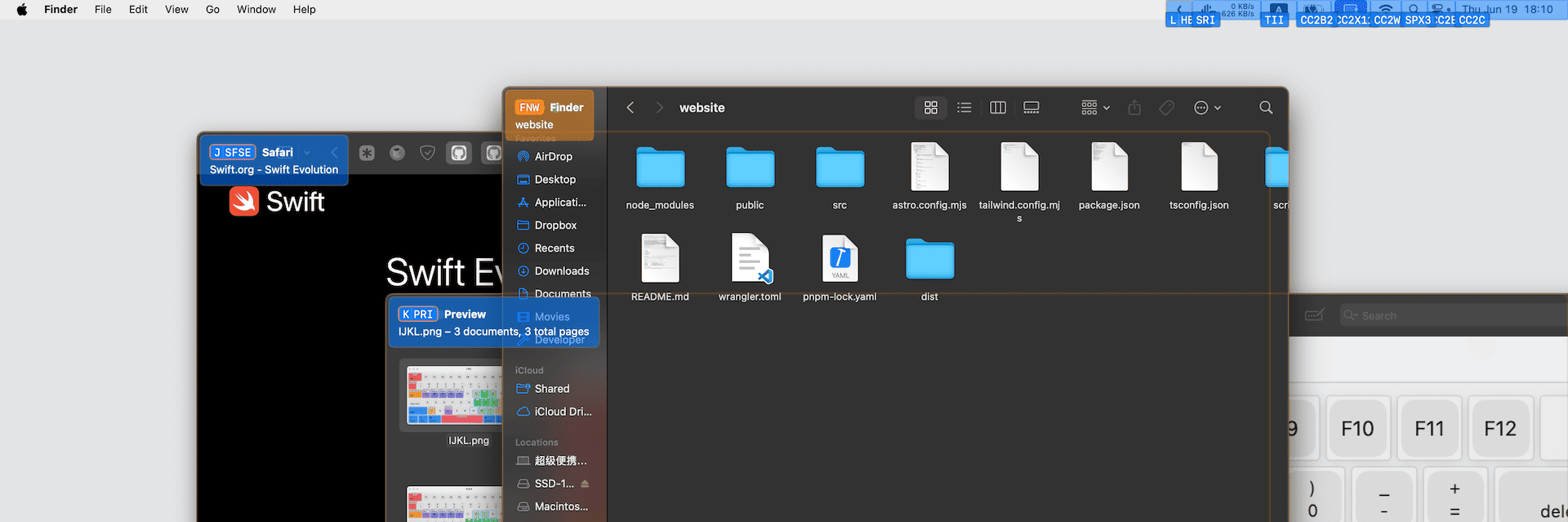
- Added cheatsheet to the overlay. It’s enabled by default and can be toggled with the
/key. - Tweaked hint generation to be more predictable than before.
- Adjusted the color of highlighted elements in the overlay. They now use the inverted color of the accent color.
- Fixed an issue where overlays would not be available in some spaces after waking from sleep.
- Fixed an issue where the mouse cursor might jump to a location off-screen.
- Fixed an issue where the rectangle in Regular Mode would sometimes be inaccurate.
0.2.2
June 16, 2025
- Fix a bug that may prevent the overlay from presenting.
- Adjust the element lookup logic so that it works in more senarios. (e.g. VSCode file tree)
- Update regular mode to use use the screen under the cursor as the reference rect instead of the active screen.
0.2.0
June 14, 2025
- Add in-app configurations.
- Adjust the Command modifier for the Regular Mode and Center Teleporter to change the reference rect to the element under the cursor. You can use this feature to make precise movements in a small area, for example, you can use the Command key to precisely position the cursor at the end of a text box to click the clear button.
- Added nine-square-grid mode for accurate movement in Regular Mode. It’s more precise than the previous bisection mode, but harder to master.
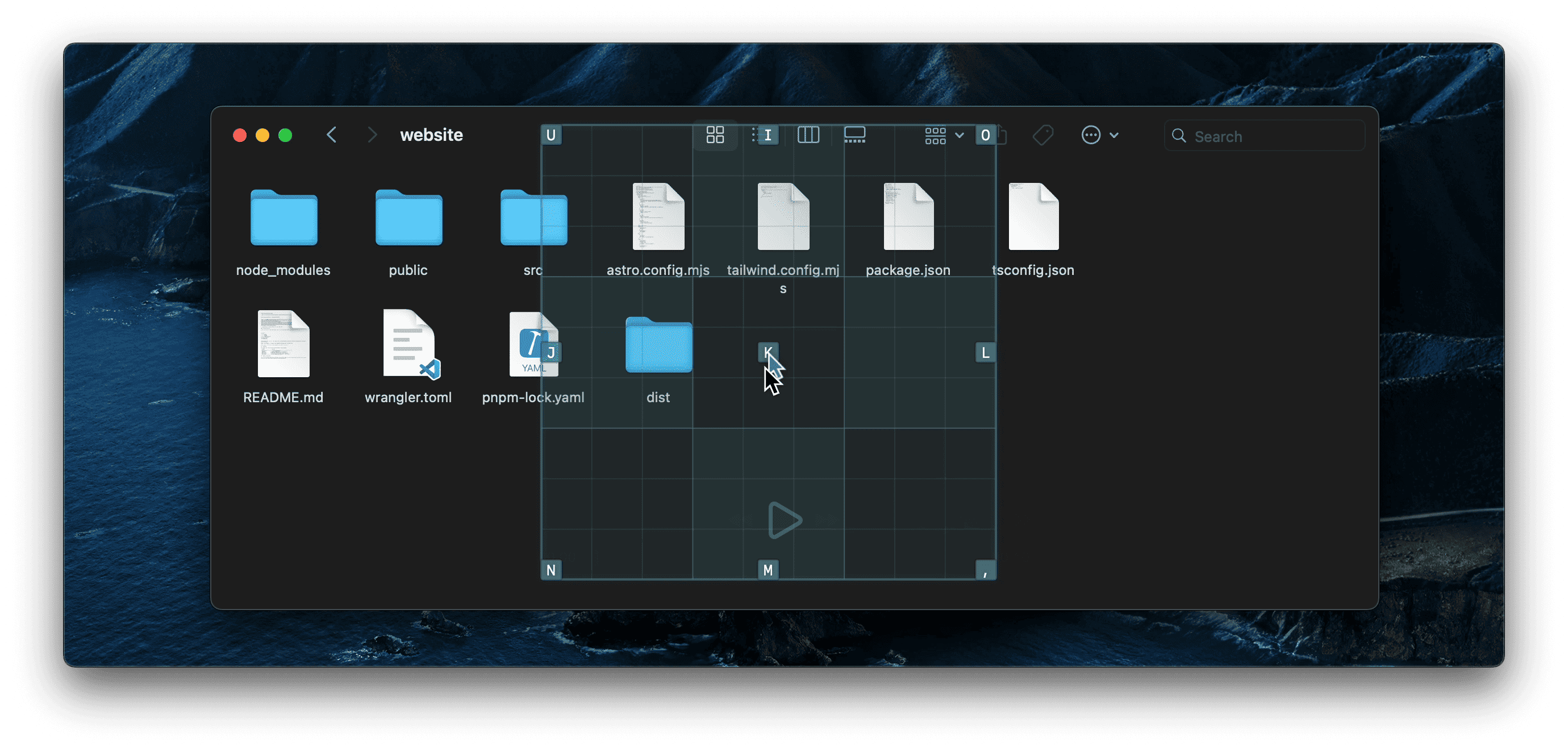
- Add animation for cursor movement.
- For each gesture, you can now hold the gesture key to perform the gesture continousely. And you can use Command and Control to adjust the distance of the gestures.
- Fix clicks with modifiers.
- Fix the overlay was not visible when mission control is active.
- Fix incorrect documentation link.